Configuration
Note
Affected user: Administrator
To configure the submission rules for submissions, go to Editorial management > Configuration. The screen displays the list of elements to be configured. These elements depend on the configuration performed.
Submission of abstract
To choose the type of document, you can consult: ref:the tutorial <video_typdoc> on this subject. If you choose the type “Abstract”, the screen looks like the image below:
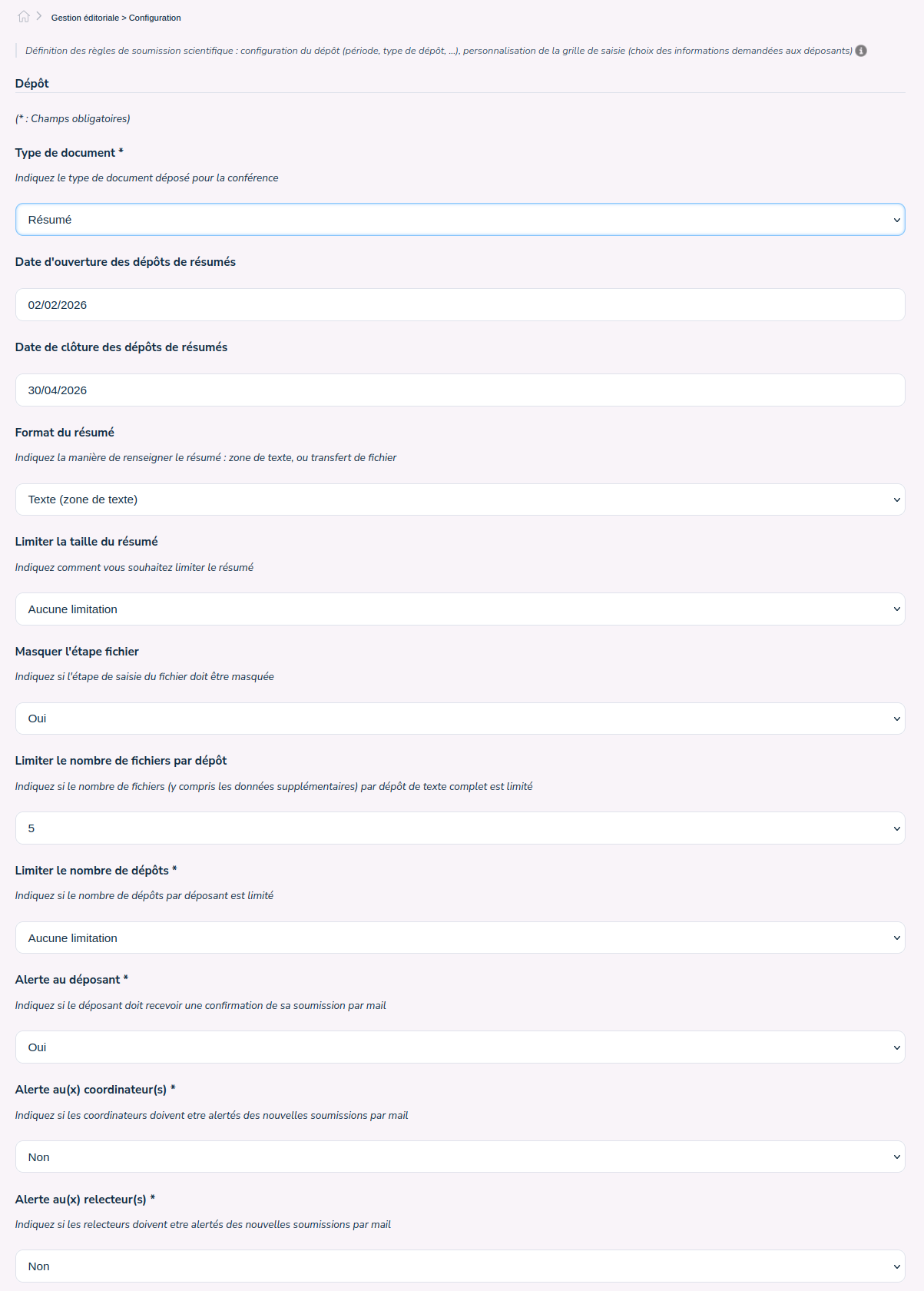
The field ‘Starting date for abstract submission’ indicates the date from which users, once logged in, will be able to submit their abstract.
The ‘Closing date for abstract submission’ field indicates the deadline for submitting abstracts.
Tip
the site administrators can make deposits even after the end date.
The ‘Abstract format ‘ can be of two types:
- a summary of type ‘Text (textfield)’ for which you can indicate:
. if there is a size limit in number of characters, in number of words or no limit, . if it is necessary to display the step allowing to deposit files (see the tutorial in french);
- a summary of type ‘File’ for which you can submit:
. a file template for the summary by clicking on the field;
The field ‘Limit the number of files per repository’ allows to indicate the maximum number of files allowed for a repository,
The ‘Limit the number of deposits’ field allows to define the maximum number of deposits per depositor (same login account),
The ‘Alert the contributor’ field allows to indicate if an email is automatically sent to the depositor as soon as he has registered his deposit. The email sent corresponds to the template titled ‘Confirmation of abstract submission to the author’,
The ‘Alert the coordinator(s)’ field allows to indicate if an email is automatically sent to the coordinators concerned as soon as the depositor has registered his deposit. The email sent corresponds to the template titled ‘New submissions’,
The ‘Alert the reviewer’ field allows indicating if an email is automatically sent to the reviewers concerned as soon as the submitter has registered their submission. The email sent corresponds to the template titled ‘New submissions’,
Submission of a fulltext
To choose the type of document, you can consult: ref:the tutorial <video_typdoc> on this subject. If you choose the type “Full text”, the screen looks like the image below:
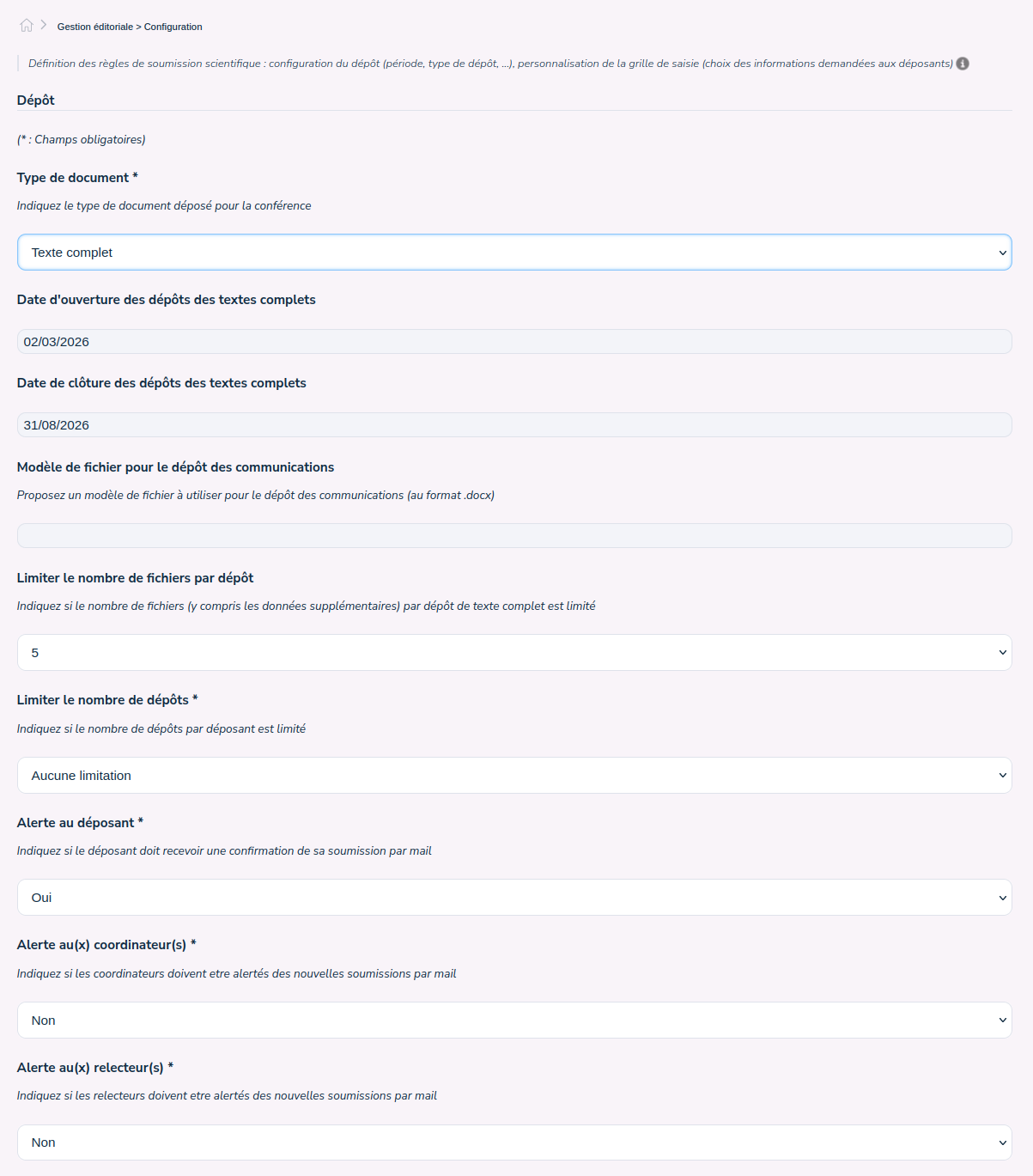
The field ‘Starting date for fulltext submission’ indicates the date from which users, once logged in, will be able to submit their full text.
The field ‘Closing date for fulltext submission’ indicates the deadline for the submission of full texts.
Tip
the site administrators can make deposits even after the end date.
The ‘Template file for communication submission’ allows to submit a full text template by clicking on the field,
The field ‘Limit the number of files per repository’ allows to indicate the maximum number of files allowed for a repository,
The ‘Limit the number of deposits’ field allows to define the maximum number of deposits per depositor (same login account),
The ‘Alert the contributor’ field allows to indicate if an email is automatically sent to the depositor as soon as he has registered his deposit. The email sent corresponds to the template titled ‘Confirmation of abstract submission to the author’,
The ‘Alert the coordinator(s)’ field allows to indicate if an email is automatically sent to the coordinators concerned as soon as the depositor has registered his deposit. The email sent corresponds to the template titled ‘New submissions’,
The ‘Alert the reviewer’ field allows indicating if an email is automatically sent to the reviewers concerned as soon as the submitter has registered their submission. The email sent corresponds to the template titled ‘New submissions’,
Submission of abstract then fulltext
To choose the type of document, you can consult: ref:the tutorial<video_typdoc> on this subject. If you choose the type “Abstract then Fulltext”, the screen looks like the image below:
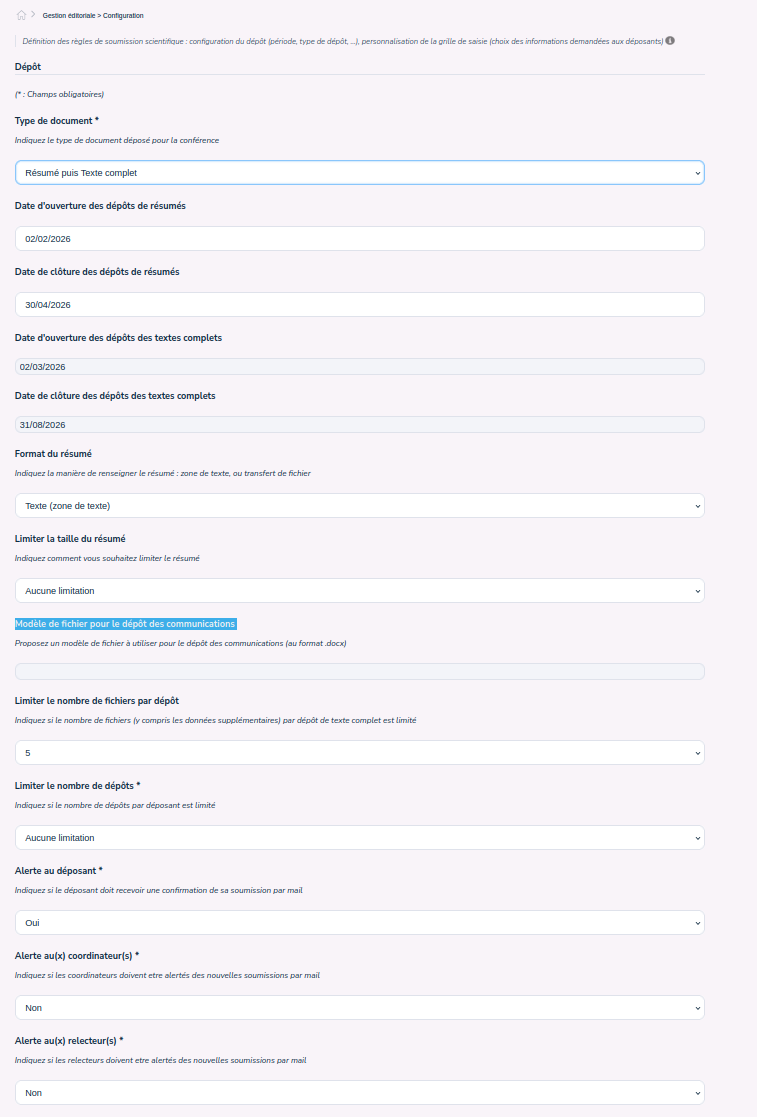
The field ‘Starting date for abstract submission’ indicates the date from which users, once logged in, will be able to submit their abstract.
The ‘Closing date for abstract submission’ field indicates the deadline for submitting abstracts.
The field ‘Starting date for fulltext submission’ indicates the date from which users, once logged in and after acceptance of their summary, will be able to submit their full text.
The field ‘Closing date for fulltext submission’ indicates the deadline for the submission of full texts.
Tip
the site administrators can make deposits even after the end date.
The ‘Abstract format ‘ can be of two types:
- a summary of type ‘Text (textfield)’ for which you can indicate:
. if there is a size limit in number of characters, in number of words or no limit,
- a summary of type ‘File’ for which you can submit:
. a file template for the summary by clicking on the field;
The ‘Template file for communication submission’ allows to submit a full text template by clicking on the field,
The field ‘Limit the number of files per repository’ allows to indicate the maximum number of files allowed for a repository,
The ‘Limit the number of deposits’ field allows to define the maximum number of deposits per depositor (same login account),
The ‘Alert the contributor’ field allows to indicate if an email is automatically sent to the depositor as soon as he has registered his deposit. The email sent corresponds to the template titled ‘Confirmation of abstract submission to the author’,
The ‘Alert the coordinator(s)’ field allows to indicate if an email is automatically sent to the coordinators concerned as soon as the depositor has registered his deposit. The email sent corresponds to the template titled ‘New submissions’,
The ‘Alert the reviewer’ field allows indicating if an email is automatically sent to the reviewers concerned as soon as the submitter has registered their submission. The email sent corresponds to the template titled ‘New submissions’,
Vous pouvez ensuite configurer la grille de saisie du résumé. Paramétrer les thématiques